
Disclosure: This article contains affiliate links. If you buy through them, we may earn a commission at no extra cost to you. It never changes our verdicts.
Every table tennis player knows the problem. Your partner is late, the club is closed, or you need 300 backhand flicks and nobody wants to feed them. Multi-ball with a coach is the most efficient training there is, but it’s expensive and hard to schedule.
That’s why robots have become serious training tools, and why PongBot’s two flagship machines are all over table tennis forums. The Nova S Pro is a compact tabletop robot that costs a fraction of what you’d expect. The Omni S Pro is a clip-on machine with automatic ball recycling that behaves much more like a coach.
They look like siblings, but they’re built for different players. By the end of this review you’ll know which one belongs at the end of your table, and which one will frustrate you.
Quick answer: Choose the Nova S Pro if you want the most capability per dollar and don’t mind picking up balls. Choose the Omni S Pro if you train often, want heavy spin, and hate interrupting a session. Jump to the verdict or keep reading for the details.
👉 Check the current Nova S Pro price (use code JJPP5 for 5% off)
👉 Check the current Omni S Pro price (use code JJPP5 for 5% off)
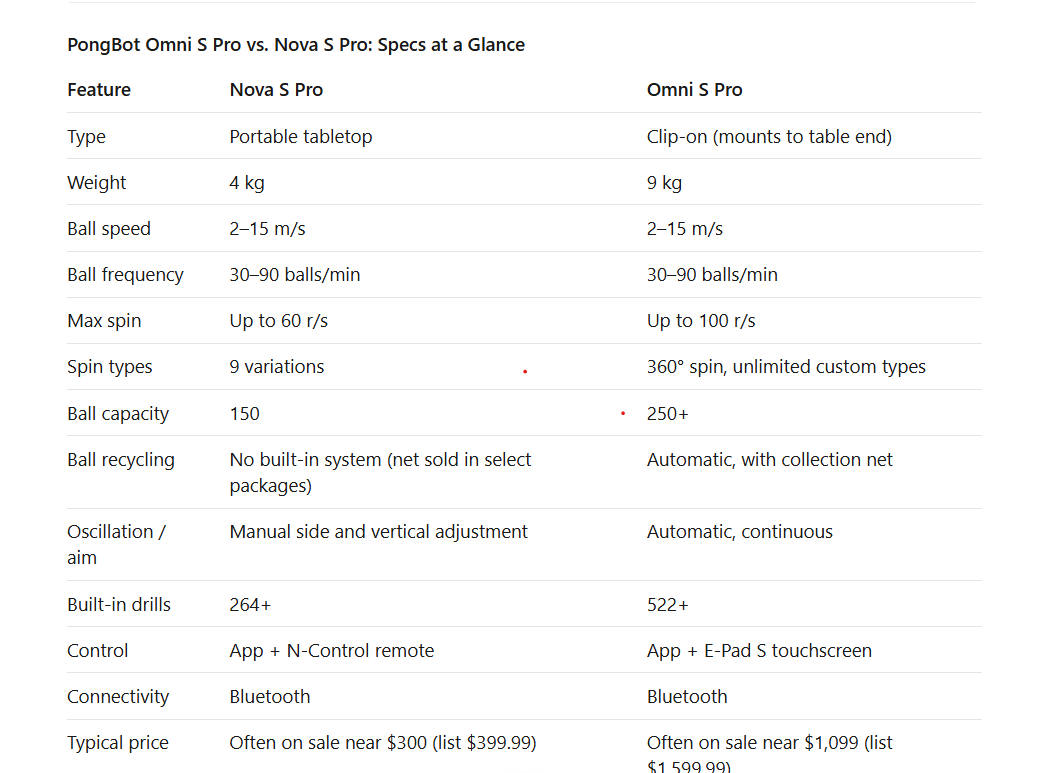
Side by side comparison of two of the best table tennis robots for practicing technique and drills
PongBot runs frequent sales, so check the links for today’s price, then stack code JJPP5 for an extra 5% off.
Technical Review: Speed, Spin and Placement
Ball speed and frequency: identical on paper
Both robots fire at 2–15 m/s and 30–90 balls per minute. That covers everything from a slow, high push to a fast drive, and from a relaxed rally to a punishing rapid-fire drill.
The Nova S Pro splits frequency into 11 levels, which is plenty for building a progression from a comfortable pace to match-speed pressure. Here the two are equals, and the price gap pays for other things.
Spin: the biggest technical difference
The Nova S Pro tops out at 60 revolutions per second across 21 levels, with nine spin variations. That’s enough to practice blocking topspin, pushing backspin and returning slow, spinny serves. Owners on the Table Tennis Daily forum have noted that 60 r/s sits below some competing machines, and serious loopers may eventually want more.
The Omni S Pro goes to 100 r/s with true 360° spin and unlimited customizable spin types. It also switches spin in about 0.66 seconds. That matters because real opponents don’t deliver the same spin twice in a row, and the Omni can mix it up. If you’re an advanced player working on your loop against heavy spin, this is the biggest reason to upgrade.
Mini-takeaway: Pick the Nova if you’re returning topspin and backspin. Pick the Omni if you need to read and attack heavy sidespin.
Placement and oscillation: manual vs. automatic
Placement is where the machines feel most different in daily use.
On the Nova S Pro, left-right oscillation and vertical and side adjustments are manual. You set a position, and the app shows you the planned landing point and trajectory. It works well for focused drills like a backhand-to-backhand block or a forehand loop to one spot. For randomized wide-angle footwork, you’ll mostly depend on the preset drills.
The Omni S Pro handles vertical and side adjustment automatically and continuously, with automatic oscillation. That’s what enables full-table footwork drills: a ball wide to the forehand, then the backhand, then the middle, with spin changing between shots. It’s the closest thing to a coach feeding multi-ball.
Drills and software
The Nova S Pro ships with 264+ preset drills, and the Omni S Pro with 522+. Both let you build custom routines in the PongBot app and preview ball paths before you start. The Omni S Pro adds the E-Pad S touchscreen, so you can adjust drills at the table without grabbing your phone mid-session.
One honest caution: owners on forums have reported some app quirks, including limited organization for custom drills. If you plan to build large libraries of drills for students or clients, factor that in.
Physical Review: Build, Size and Setup
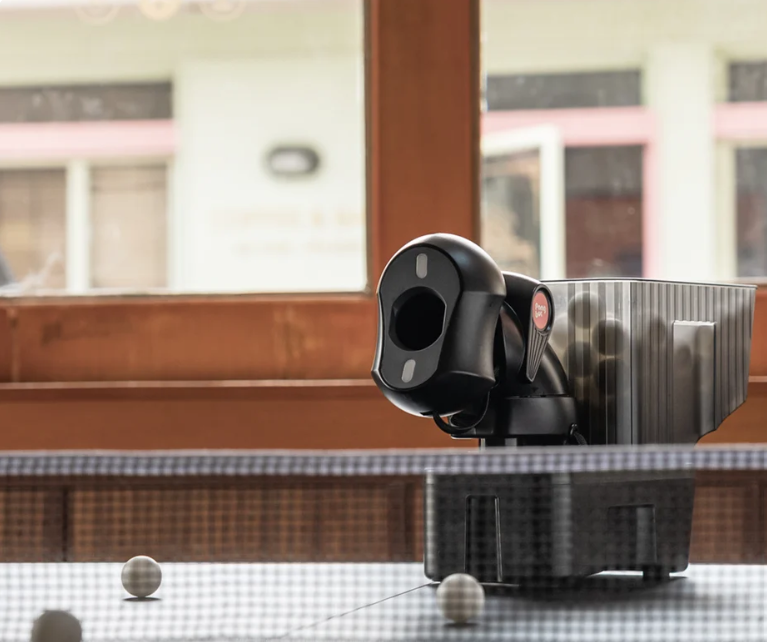
At 4 kg it sits directly on the table and can be repositioned for different feeding angles and near-net drills. It’s easy to store, take to a club or toss in a car. The 150-ball hopper handles a decent block of practice before it needs refilling.
The tradeoff is the one every reviewer mentions: no built-in ball recycling. When the hopper empties, you stop and collect balls. Some packages include a collection net, and it helps, but it isn’t the same as a fully integrated system.
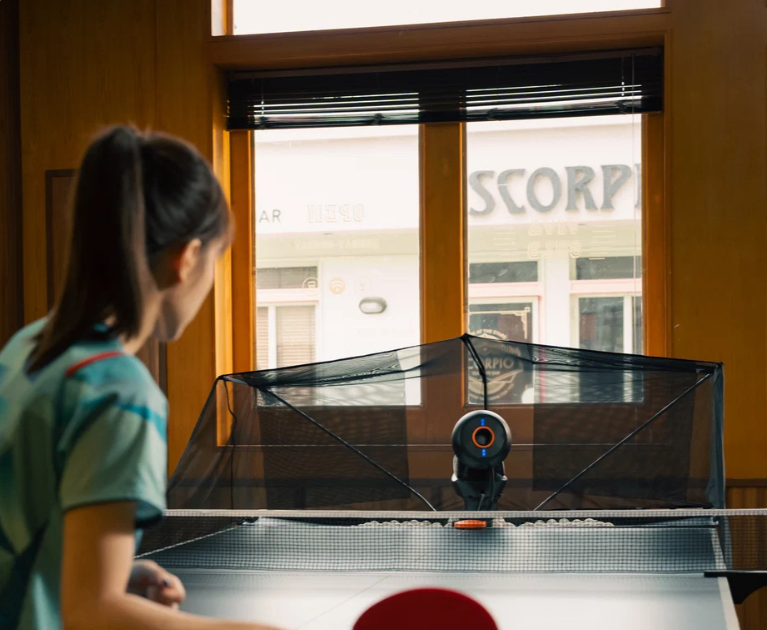
The Omni S Pro is a 9 kg clip-on machine that mounts to the end of your table with clamps. It holds 250+ balls, and its net catches and feeds balls back into the machine automatically. Setup takes a few minutes, but once it’s clipped on, you can train for a long stretch without interruption.
It’s heavier and bulkier, so it suits a dedicated table at home, a club or a coaching setup better than a spare-room table you fold away each night.
Real-World Use: Who Each Robot Is Actually For
Choose the Nova S Pro if you are...
A beginner or intermediate player working on fundamentals like forehand and backhand drives, blocks, pushes and flicks
On a budget but want app control, custom drills and real adjustability
Short on space or needing a portable robot for travel and club nights
Happy to collect balls, which is also a free mini-break between sets
Reviewers have repeatedly called it the best-value option in its price range, and for a lot of players it’s all the robot they’ll ever need.
👉 See the Nova S Pro deal and add code JJPP5 for 5% off
Choose the Omni S Pro if you are...
An advanced player or competitor who needs heavy spin and fast spin changes
A coach or club running regular multi-ball and solo sessions
Someone who wants long, uninterrupted sessions with automatic recycling
Training for match-like footwork with automatic oscillation and randomized placement
If you’re logging hours at the table every week, the Omni S Pro pays for itself in time saved on ball pickup alone.
👉 See the Omni S Pro deal and add code JJPP5 for 5% off
What Could Go Wrong: Honest Drawbacks
No robot is perfect, and you should know the limits before you buy.
Nova S Pro
No integrated ball recycling
Manual spin-side and aim adjustment
Spin tops out at 60 r/s
Some owners report that overfilling the hopper causes misfires
Omni S Pro
Significantly more expensive
Heavier and needs table-end clearance for the clamp and net
Looks like overkill for beginners
Some buyers who imported units from overseas have reported connection problems, so buy from an authorized seller to protect your warranty
Worth knowing: If the Omni S Pro is more than you need, PongBot also sells the Omni S Plus. It’s the same clip-on design with auto-recycling, but without the E-Pad S touchscreen, with 198 preset drills instead of 522, and with spin capped at 80 r/s. It’s an attractive middle step.
The Verdict: Which Should You Buy?
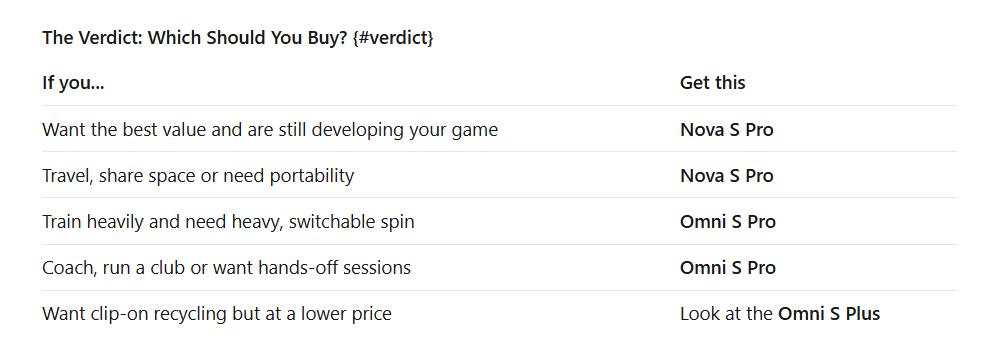
If you’re torn, ask yourself one question: will I train long enough, often enough, that picking up balls becomes the thing that stops me? If yes, the Omni S Pro. If no, the Nova S Pro gets you 80% of the benefit at a fraction of the cost.
PongBot’s sales come and go, so the best price you’ll see is rarely the list price. Check both links below, then enter code JJPP5 at checkout for an extra 5% off.
🏓 Buy the Nova S Pro (best value)
🏓 Buy the Omni S Pro (best performance)
FAQ
Is the PongBot Omni S Pro worth the money?
For frequent trainers, coaches and advanced players, yes. Automatic recycling, 100 r/s spin and automatic oscillation add up to a very different training experience from the Nova. For casual players, the Nova S Pro is the smarter spend.
What’s the difference between the Nova S Pro and the Omni S Pro?
The Nova is a portable tabletop robot with 60 r/s spin, manual adjustment and no built-in recycling. The Omni is a clip-on robot with 100 r/s spin, automatic oscillation and adjustment, a 250+ ball capacity and an integrated recycling net.
Can the Nova S Pro recycle balls?
Not on its own. A compatible collection net is included in some packages, but the robot doesn’t have an integrated recycling system.
Can beginners use the Omni S Pro?
Absolutely, though much of its power is wasted at that stage. Beginners get more value from a Nova S Pro and the savings.
Can I create custom drills?
Yes. Both robots let you build custom drills through the PongBot app, and the Omni S Pro also offers the E-Pad S touchscreen for at-the-table control.
Is there a PongBot discount code?
Yes. Use code JJPP5 at checkout for 5% off.
Does a robot replace a human practice partner?
No. Robots are brilliant for repetition and technique, but they work best alongside serve practice and match play against real opponents.
Ready to Train Smarter?
Every session without structure is a session you’re guessing. A robot gives you hundreds of identical, repeatable balls, and that’s how technique gets locked in.
👉 Grab the Nova S Pro → (best value)
👉 Grab the Omni S Pro → (best performance)
Don’t forget: code JJPP5 takes 5% off at checkout.
